Connect the Dots aka ASCIImage in F#
Recently I came across a great blog post introducing ASCIImage program. What does it do? Given:
. . . . . . . . . . .
. . A B . . . . . . .
. . J # # . . . . . .
. . . # # # . . . . .
. . . . # # # . . . .
. . . . . I # C . . .
. . . . . H # D . . .
. . . . # # # . . . .
. . . # # # . . . . .
. . G # # . . . . . .
. . F E . . . . . . .
. . . . . . . . . . .
Then:
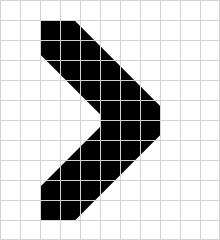 Yay! Now every programmer can be an icon designer ...and it makes for decent F#
kata.
Yay! Now every programmer can be an icon designer ...and it makes for decent F#
kata.
We need to connect the dots (denoted by letters) and the following rules apply:
- A single isolated dot encodes 1 pixel
- A sequence of dots (i.e. consecutive letters: A, B, C...) translates to a polygon
- A dot repeated four times defines an ellipse
- Finally, a dot repeated two times defines a line
I decided to introduce some minor format changes. I wanted the input format to be self-contained without the need for providing additional code (i.e. blocks in Objective-C version). Just create a text file, run program and voilà, see the result. I choose to support only black (solid) and white (transparent) shapes. Now letters A..Z encode the former and a..z the latter.
Let's start with type-first approach:
type Dot = int * int

type Shape =
    | Pixel of Dot
    | Line of Dot * Dot
    | Ellipse of Dot * Dot * Dot * Dot
    | Polygon of Dot list

type Opacity = Solid | Transparent

type ParserApi = string [] -> (Opacity * Shape) list
Our goal is to implement ParserApi function transforming ASCII representation into list of shapes. We can start by extracting dots with their positions (string [] -> ((Dot * Opacity) * int) list):
let ascii2dots (arr : string []) =
    let (|InRange|_|) first last = function
        | c when c >= first && c <= last -> Some(int(c) - int(first))
        | _ -> None

    [ for y in 0..arr.Length - 1 do
          let row = arr.[y].Replace(" ", "")
          for x in 0..row.Length - 1 do
              match row.[x] with
              | InRange 'A' 'Z' idx -> yield (((x, y), Solid), idx)
              | InRange 'a' 'z' idx -> yield (((x, y), Transparent), idx)
              | _ -> () ]
As you can see, F# features like pattern matching, active patterns (|InRange|) and defining list with "yields" ([ for … ]) make for very concise and readable code.
Let's pretend that we have an active pattern for every rule. Those patterns would examine the beginning of the list and if matched return one or more dots making the shape, its opacity and the tail - list of unmatched dots. Given that we could write parser in just a few lines:
let rec parse dots =
    [ match dots with
      | Single(p, op, tail) -> yield op, Pixel(p); yield! parse tail
      | Sequence(points, op, tail) -> yield op, Polygon(points); yield! parse tail
      | Quad(points, op, tail) -> yield op, Ellipse(points); yield! parse tail
      | Duo(points, op, tail)-> yield op, Line(points); yield! parse tail
      | _ -> () ]

let api : ParserApi = fun rep -> rep |> ascii2dots |> List.sortBy snd |> parse
Recursive list definition with yield bang - sweet! And now the time has come for remaining patterns.
The dot is considered "single" if the next one is skipped (e.g. A, C, E...) or is the last one. Piece of cake:
let (|Single|_|) = function
    | ((p, op), i1)::(d2, i2)::tail when i2 = i1 + 2 -> Some(p, op, (d2, i2)::tail)
    | ((p, op), _)::[] -> Some(p, op, [])
    | _ -> None
Patterns for dots repeated 4 or 2 times are also straightforward:
let (|Quad|_|) = function
    | ((p1, op), i1)::((p2, _), i2)::((p3, _), i3)::((p4, _), i4)::tail
        when i1 = i2 && i2 = i3 && i3 = i4 -> Some((p1, p2, p3, p4), op, tail)
    | _ -> None

let (|Duo|_|) = function
    | ((p1, op), i1)::((p2, _), i2)::tail when i1 = i2 -> Some((p1, p2), op, tail)
    | _ -> None
Beware, they must be applied in order.
The most difficult pattern is the sequence because we need to collect unspecified number of consecutive dots:
let (|Sequence|_|) dots =
    let wrapResult points tail =
        match points with
        | (_, op)::_ -> Some(points |> List.map fst |> List.rev, op, tail)
        | [] -> None

    let rec collect acc = function
        | (d1, i1)::(d2, i2)::tail when i2 = i1 + 1 -> collect (d1::acc) ((d2, i2)::tail)
        | Single(p, op, tail) -> wrapResult ((p, op)::acc) tail
        | tail -> wrapResult acc tail

    collect [] dots
That's all - parser is ready. What's left is to generate bitmap from list of shapes. But drawing is boring: mostly an API driven code. I'll show you only the type signature (the rest is on GitHub):
type DrawingApi = Parser.ParserApi -> int -> string [] -> System.Drawing.BitmapGiven a parser, scale and ASCII representation, DrawingApi implementation should return a bitmap. Drawing module depends only on a parser abstraction. In the composition root (aka main) you tie it together:
open System
open System.IO

let ascii2image inputFile scale =
    let asciiRep = File.ReadAllLines(inputFile)
    // Poor man's dependency injection
    let draw = DrawingImplementation.api ParserImplementation.api
    let bitmap = draw scale asciiRep
    bitmap.Save(inputFile.Replace(".txt", ".png"), System.Drawing.Imaging.ImageFormat.Png)

[<EntryPoint>]
let main = function
    | [|inputFile|] -> ascii2image inputFile 1; 0
    | [|inputFile; scale|] -> ascii2image inputFile (Int32.Parse(scale)); 0
    | _ -> printfn "Example usage: ascii2image file.txt"; -1
You can find full source code on GitHub.
Final thoughts
Code above is twice as long as my first attempt. For example, you could inline all the active patterns and make it one complicated recursive function. But I wanted it to be explicit - no comments, the code should speak for itself. Oh, almost forgot. Let's draw some familiar logo :)
. . H # I A # . . . .
c . K # # d J # # . .
. . . . . b # # # # .
W # # X . . . # # # #
Z # # Y . . . . # # #
A . b . . . . . b # A
R # # S . . . . # # #
U # # T . . . # # # #
. . . . . b # # # # .
f . M # # e N # # . .
. . P # O A # # . . .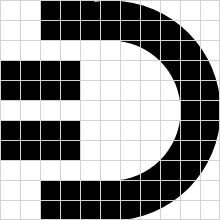
Comments (2)
Comments are from the original WordPress blog. New comments are not supported.
Very nice! I have added the port to http://asciimage.org Regarding self-contained text representation, YAML has been proposed for optionally specifying drawing attributes. It's a good fit as it's really meant to be human-readable and has easy support for multi-line strings. Have a look at issue #2 on the ObjC project and let us know if you have more thoughts: https://github.com/cparnot/ASCIImage/issues/2
Yep, my choice is very limiting - even in the example above I've used all letters :). I did it for simplicity. Another idea was to use spaces before symbols to add some additional settings.